Here’s a shocking statistic: more than 25% of household insurance claims related to moving involve damaged electronics, with televisions ranking among the most commonly broken items. The surprising part? Most of that damage happens before the TV even reaches the moving truck. Incorrect packing, poor lifting techniques, and improper transport are usually the real culprits. If you’re searching for experienced removalists Melbourne, reliable movers in Melbourne, or a professional Moving Guide and Packing Guide, learning how to move your television correctly could save you hundreds—or even thousands—of pounds in replacement costs.
Let’s face it—modern TVs are bigger, thinner, and far more expensive than they were a decade ago. While today’s OLED, QLED, LED, and Smart TVs deliver incredible picture quality, they also require much more careful handling. One wrong grip, one unexpected bump, or one poorly packed moving box can turn movie night into an expensive disaster. Whether you’re moving across Melbourne or relocating interstate, this comprehensive packing guide for moving will show you exactly how to prepare, pack, transport, and unpack your television safely. We’ll also explain when it’s worth hiring professional house removalists Melbourne to protect one of the most valuable electronics in your home.
Moving TV Safely – Why Proper Preparation Matters
Many homeowners assume a television is just another household item that can be wrapped in a blanket and loaded into the truck. Unfortunately, modern televisions are far more delicate than they appear. Ultra-thin displays, lightweight frames, sensitive internal components, and large glass panels mean even a relatively small impact can cause permanent damage.
Unlike furniture, televisions cannot absorb pressure evenly. If a heavy object presses against the screen during transport, the internal display can crack even when the outer glass appears undamaged. That’s why experienced furniture removalists Melbourne spend extra time preparing electronics before loading them into the moving vehicle.
Proper preparation begins long before moving day. Understanding your TV’s size, weight, mounting system, and original packaging can dramatically improve its chances of arriving safely at your new home.
Moving Guide – Why TVs Are Easily Damaged During a Move
Flat-screen televisions are engineered for outstanding viewing experiences—not for surviving bumpy roads, tight staircases, or awkward lifting angles. Their slim profiles make them easier to install on walls, but those same design features also make them more vulnerable during relocation.
Some of the most common causes of TV damage include:
- Pressure applied directly to the screen.
- Dropping the television while lifting.
- Incorrect wrapping materials.
- Loose packing inside the truck.
- Placing heavy furniture against the display.
- Transporting the TV flat instead of upright.
- Moisture exposure.
- Sharp impacts during loading or unloading.
Professional house movers Melbourne know that preventing damage is always easier—and far less expensive—than replacing an entire television.
Packing Guide – Essential Supplies for Moving a TV
Using the correct packing materials is the single most effective way to protect your television during relocation. While it may be tempting to reuse old cardboard boxes or wrap the TV in a duvet, these shortcuts rarely provide enough protection for modern screens.
Before packing your television, gather the following supplies:
TV Packing Checklist
- Original TV box (if available)
- Foam inserts
- Bubble wrap
- Packing paper
- Foam corner protectors
- Moving blankets
- Stretch wrap
- Heavy-duty packing tape
- Permanent marker
- Cable ties
- Zip-lock bags for screws
- Anti-static cloth
- TV moving box (if original packaging is unavailable)
Investing in quality packing materials costs significantly less than replacing a damaged OLED or QLED television.
Should You Keep the Original TV Box?
If you’ve ever wondered whether it’s worth storing the original TV box after purchase, the answer is almost always yes.
Manufacturers design original packaging specifically to protect televisions during transport. The foam inserts support the frame without placing pressure on the screen, while the reinforced carton absorbs impacts far better than standard moving boxes.
If you’ve kept your original packaging, congratulations—future you deserves a thank-you. If not, don’t panic. Adjustable TV moving boxes with foam corner protectors are an excellent alternative and are widely used by professional house removalists Melbourne.
Packing Guide for Moving – Prepare Your Television Before Packing
Packing should never begin by simply unplugging the TV and wrapping it in bubble wrap. Preparing your television correctly helps prevent accidental damage and makes setting it up again much easier after the move.
Start by switching the television off completely and allowing it to cool for a few minutes if it has been in use. Dust and clean the screen using a soft microfibre cloth designed for electronics. Avoid spraying cleaning solution directly onto the display, as moisture can seep into sensitive components.
Next, disconnect every cable carefully. HDMI leads, power cords, Ethernet cables, gaming console connections, soundbars, streaming devices, and antenna cables should all be removed individually rather than pulled out together. Label each cable before storing it inside a clearly marked zip-lock bag. This simple step saves considerable time during reinstallation.
Professional movers in Melbourne also recommend photographing the rear cable connections before disconnecting everything. These reference photos make reconnecting home entertainment systems surprisingly straightforward once you’ve settled into your new property.
Remove the TV Stand or Wall Mount
Most televisions are safer to transport without their pedestal stand attached. Carefully remove the stand following the manufacturer’s instructions and place all screws, bolts, washers, and mounting brackets into a labelled plastic bag. Tape the bag securely to the stand rather than the television itself.
If your television is wall-mounted, remove the mounting brackets carefully and inspect them for damage before packing. Large wall brackets can be wrapped separately using moving blankets or bubble wrap.
Keeping every component together prevents frustration when you’re ready to reinstall the television in your new home.
Moving TV – Should You Transport It Upright or Flat?
One of the most frequently asked questions homeowners have is whether televisions should travel upright or lying flat.
The answer is simple: always transport a television upright whenever possible.
Flat-screen televisions are engineered to stand vertically. Transporting them flat places uneven pressure across the display, increasing the risk of internal screen damage—particularly on larger OLED and QLED models.
Professional furniture movers Melbourne secure televisions vertically against padded sections of the truck using straps that prevent movement without applying pressure directly to the display. This method significantly reduces the risk of vibration-related damage throughout the journey.
Common Preparation Mistakes Before Moving a TV
Many moving accidents occur before the television even leaves the house. Avoid these common mistakes:
- Forgetting to photograph cable connections.
- Leaving the TV stand attached.
- Using thin blankets instead of protective padding.
- Packing loose accessories separately.
- Carrying the TV by the screen.
- Waiting until moving day to find packing supplies.
- Transporting the TV flat inside the vehicle.
- Skipping corner protection.
Avoiding these errors dramatically improves the chances of your television arriving safely at its destination.
Packing Guide for Moving – Step-by-Step Guide to Packing Your TV
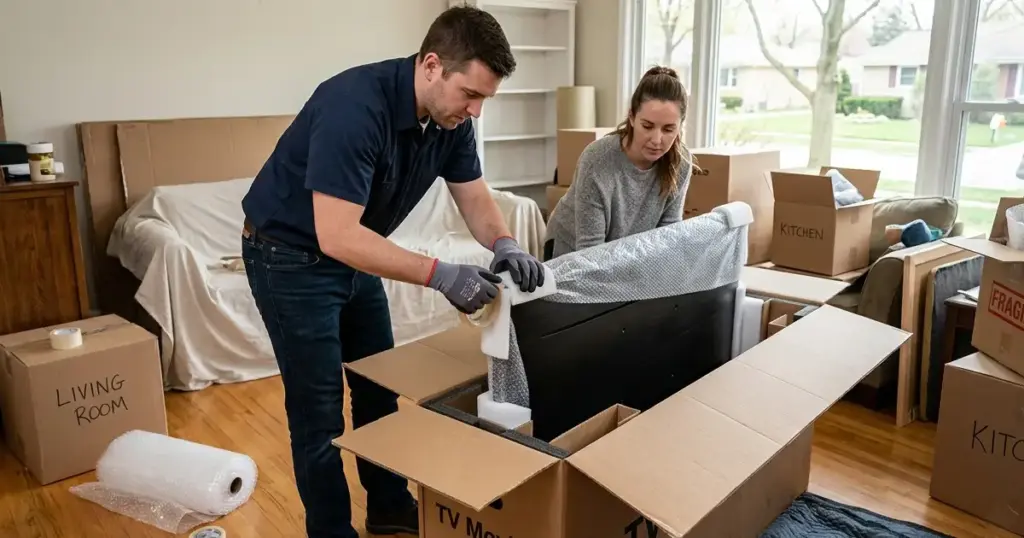
Packing a television properly is about much more than wrapping it in bubble wrap. Every layer of protection has a specific purpose, from preventing scratches on the screen to absorbing shocks during transport. Professional removalists Melbourne follow a proven sequence to minimise risk, and homeowners can use the same approach to protect their investment.
Before you begin, make sure your television has been disconnected, cleaned, and prepared as described. Gather all your packing materials in one place so you won’t need to stop halfway through the process. Working in a clean, open area also reduces the chances of accidentally knocking the television against furniture or walls.
Step 1: Protect the Screen First
The display is the most delicate part of any television. Before applying bubble wrap, cover the screen with a soft microfibre cloth, foam sheet, or specialised TV screen protector. This creates a protective barrier that helps prevent fine scratches while the television is being wrapped.
Avoid placing tape directly onto the television’s frame or screen. Adhesive residue can be difficult to remove and may damage certain finishes. If you need to secure protective materials, wrap the television with stretch film around the outside rather than attaching tape directly to the unit.
Step 2: Wrap the Television with Bubble Wrap
Once the screen is protected, wrap the entire television with several layers of large-cell bubble wrap. Pay particular attention to the corners, as these areas are most vulnerable to accidental impacts during lifting and transport.
Secure the bubble wrap with packing tape around the outside of the wrapping—not directly against the television. The goal is to keep the protective layers in place while ensuring the TV itself remains untouched by adhesive materials.
Professional house removalists Melbourne often add a moving blanket over the bubble wrap to provide another layer of cushioning against knocks and vibrations.
Step 3: Install Corner Protectors
Television corners absorb much of the impact if the unit is bumped during transport. Foam corner protectors are inexpensive yet highly effective because they disperse pressure away from the frame.
Place protectors securely on all four corners before sliding the television into its box. If dedicated corner protectors are unavailable, folded cardboard reinforced with foam padding can provide additional support, although purpose-built protectors remain the preferred option.
Step 4: Place the TV Inside a Suitable Box
Whenever possible, use the original manufacturer’s carton. If that isn’t available, purchase an adjustable TV moving box designed for flat-screen televisions.
Position the television carefully inside the box without forcing it into place. Add foam inserts or packing paper around all sides so the TV fits snugly without excessive pressure. Empty spaces inside the box should always be filled to prevent movement while the vehicle is in motion.
Once sealed, gently shake the carton. If you hear movement, reopen the box and add more protective filling before transporting it.
Moving TV – How to Pack OLED, QLED, LED and Smart TVs
Not all televisions are built the same. Although the packing principles remain similar, different display technologies have unique characteristics that deserve additional attention.
OLED Televisions
OLED screens are exceptionally thin and produce outstanding picture quality, but they are also among the most delicate televisions available. Their slim panels can flex under pressure, making upright transport absolutely essential.
Never stack other boxes against an OLED television inside the truck. Professional furniture removalists Melbourne usually secure OLED TVs against padded truck walls using adjustable straps that hold the unit firmly without compressing the display.
QLED and LED Televisions
QLED and LED televisions are generally more rigid than OLED models but still require careful handling. Protect the screen thoroughly, reinforce the corners, and ensure the box fits securely without allowing movement during transport.
Although these models are slightly more robust, they should never be laid flat beneath heavy furniture or appliances.
Curved Televisions
Curved televisions present additional challenges because their shape distributes pressure differently. Use extra foam padding around the curved edges and ensure the carton supports the display evenly across its entire surface.
Because of their unusual shape, curved TVs often benefit from professional handling by experienced house movers Melbourne.
Moving Guide – How to Load a TV into the Moving Truck
Even a perfectly packed television can be damaged if it is loaded incorrectly. Loading techniques are just as important as packing methods, which is why experienced movers follow strict procedures when handling expensive electronics.
The television should always be loaded vertically against a secure, padded section of the truck. Use moving straps to prevent shifting while avoiding excessive tension that could place pressure on the frame.
Never position televisions beneath heavy furniture, mattresses, appliances, or stacks of moving boxes. Weight pressing against the display may cause internal damage that isn’t immediately visible until the television is switched on.
Professional house moving service providers also recommend loading televisions later in the process so they remain easily accessible and less likely to become trapped beneath other household goods.
Secure the Box Properly
Movement inside the truck is one of the leading causes of electronic damage. Even relatively smooth roads generate continuous vibrations that can gradually shift unsecured items.
Use adjustable straps or load bars to keep the television stable throughout the journey. Check that the TV cannot slide forwards, backwards, or sideways before closing the truck doors.
A few extra minutes spent securing the load can prevent expensive repairs later.
Packing Guide – Transporting a TV in Your Own Vehicle
If you’re moving a smaller television yourself, you may decide to transport it in your own car or SUV. While this is perfectly possible, the same safety principles still apply.
Position the television upright whenever practical and secure it using seatbelts or cargo straps to prevent movement. Surround the box with soft items such as pillows or blankets to provide additional cushioning without applying direct pressure.
Avoid placing the television in direct sunlight for extended periods, particularly during hot Australian summers. Excessive heat can affect delicate electronic components, especially if the television remains inside a parked vehicle for several hours.
Moving Guide – Lifting a Television Correctly
Large televisions are awkward rather than exceptionally heavy. Attempting to lift them alone often results in poor grip, accidental twisting, or impacts against nearby walls and furniture.
Whenever possible, two people should lift larger televisions together. Hold the frame firmly using both hands and avoid placing pressure on the screen itself. Keep the television close to your body, bend your knees rather than your back, and communicate clearly while navigating stairs or tight corners.
Professional movers in Melbourne use lifting straps and specialised handling techniques to reduce the risk of both injury and equipment damage.
Common TV Packing Mistakes Homeowners Make
Despite good intentions, many people unknowingly increase the risk of damaging their television during a move.
Some of the most common mistakes include:
- Wrapping the TV in blankets without proper padding.
- Using oversized boxes that allow movement.
- Forgetting foam corner protection.
- Carrying the television by the screen.
- Leaving loose accessories inside the box.
- Transporting the TV flat.
- Storing heavy items against the display.
- Using damaged or weak cardboard cartons.
- Waiting until moving day to purchase packing materials.
Avoiding these mistakes dramatically improves the safety of your television throughout the moving process.
Professional Packing Tips from Removalists Melbourne
Experienced removalists Melbourne transport televisions almost every day, and their advice remains remarkably consistent.
Their top recommendations include:
- Keep the original packaging whenever possible.
- Label the television box clearly on every side.
- Photograph cable connections before disconnecting.
- Remove wall mounts and stands separately.
- Keep screws inside labelled bags.
- Protect every corner.
- Always transport televisions upright.
- Inspect the TV before plugging it in at your new home.
These practical habits take only a few extra minutes but significantly reduce the likelihood of expensive damage.
Moving TV – How to Unpack Your Television Safely
Congratulations—you’ve made it to your new home. However, the job isn’t finished yet. Many televisions are accidentally damaged during unpacking because homeowners rush to get everything connected for the first movie night. Taking an extra ten minutes to unpack carefully can prevent unnecessary scratches, cracked screens, or damaged ports.
Begin by placing the TV box on a clean, flat surface with enough room to move around comfortably. Remove the packing tape carefully using a safety knife, ensuring the blade never comes close to the television itself. Lift away the protective foam, bubble wrap, and blankets one layer at a time rather than pulling everything off quickly. This careful approach prevents the screen from being knocked against furniture or the floor while being removed from its packaging.
Inspect Your Television Before Installation
Before plugging the television into a power outlet, carry out a complete visual inspection. Check the screen under natural light for scratches, cracks, pressure marks, or any signs of impact. Inspect the corners and frame for dents that may indicate the television absorbed a knock during transport.
Also examine the rear panel, ventilation openings, HDMI ports, antenna connection, and power socket for any visible damage. If the television was transported by professional removalists Melbourne, report any concerns immediately before completing the final paperwork. Early reporting makes it much easier to resolve accidental damage through the moving company’s claims process if required.
Packing Guide – Reinstalling Your Television Correctly
Once you’ve confirmed the television is undamaged, begin reconnecting your entertainment system. If you photographed the cable layout before moving, now is the perfect time to use those images. They eliminate guesswork and make reconnecting devices much faster.
Reconnect the power cable first, followed by HDMI leads, gaming consoles, streaming devices, soundbars, Wi-Fi adapters, and antennas. Ensure every cable fits securely without forcing connectors into the ports. Modern televisions contain delicate circuit boards, and excessive force can damage connection points that are expensive to repair.
After everything is connected, switch on the television and check for any unusual display issues such as flickering, vertical lines, dark patches, or dead pixels. If the picture and sound operate normally, your Moving TV project has been a success.
Moving Guide – Should You Mount Your TV Immediately?
Many homeowners are eager to mount their television on the wall as soon as they arrive, but waiting until you’ve fully unpacked the room is often the smarter option. Furniture placement, cable management, and seating positions may change once the home is organised.
If you decide to wall-mount your television immediately, ensure the bracket has been reassembled correctly using the labelled screws you packed earlier. Confirm the wall can safely support both the bracket and the television’s weight before drilling any holes.
Professional house movers Melbourne frequently recommend testing the TV on its stand first. This confirms it survived the move without issues before investing time in wall installation.
Moving Guide – How to Move Multiple TVs
Modern homes often contain several televisions located in bedrooms, living rooms, studies, and entertainment areas. Each screen should be packed individually using its own protective materials rather than attempting to combine accessories or stack multiple TVs together.
To avoid confusion during unpacking:
- Label every TV box with its destination room.
- Store each remote with the correct television.
- Keep power cables together using cable ties.
- Number each box if multiple TVs are similar sizes.
- Photograph every setup before disconnecting.
This organisation saves considerable time when reconnecting your entertainment systems and reduces the chance of mixing accessories between different televisions.
Packing Guide for Moving – DIY vs Hiring Professional Movers
One of the biggest decisions homeowners face is whether to move their television themselves or trust experienced professionals. Both options have advantages, but the right choice often depends on the size of the television, travel distance, and your confidence in handling delicate electronics.
DIY TV Moving
Moving the television yourself offers complete control over how it is packed and transported. If you’re relocating only a short distance and have the correct packing materials, this can be a practical solution. However, you’ll also be responsible for lifting, securing the TV inside the vehicle, and ensuring it remains protected throughout the journey.
Professional TV Moving
Hiring experienced house removalists Melbourne provides access to trained movers who transport televisions and other valuable electronics every day. They use purpose-built equipment, furniture blankets, lifting straps, protective padding, and proven loading techniques that significantly reduce the likelihood of accidental damage.
For larger OLED, QLED, or premium televisions, professional assistance often represents excellent value compared with the potential cost of replacing a damaged display.
When Should You Call Professional Furniture Movers Melbourne?
Certain situations make hiring professionals the safest option. Consider using experienced furniture movers Melbourne if:
- Your television is larger than 65 inches.
- You own an OLED or premium QLED television.
- You’re moving interstate.
- The property has multiple flights of stairs.
- Access is limited by narrow hallways or lifts.
- The TV is wall-mounted above a fireplace.
- You’re transporting several expensive electronics.
Professional movers have specialised equipment designed specifically for these more challenging situations, allowing them to work efficiently while minimising risk.
Why Choose Pathway Movers?
When you’re moving valuable electronics like televisions, choosing the right removalist matters just as much as choosing the right packing materials. At Pathway Movers, we understand that your TV isn’t just another household item—it’s often the centrepiece of your family’s entertainment, and it deserves professional care from start to finish.
Here's Why Melbourne Families Trust Pathway Movers
- Experienced and professionally trained removalists.
- Safe handling of OLED, QLED, LED, and Smart TVs.
- High-quality moving blankets and protective equipment.
- Professional furniture wrapping and secure loading techniques.
- Fully insured moving services for added peace of mind.
- Transparent pricing with no hidden surprises.
- Friendly customer support from booking to delivery.
- Modern GPS-tracked moving trucks.
- Local Melbourne and interstate moving specialists.
- Hundreds of satisfied customers across Melbourne.
Whether you’re moving from a one-bedroom apartment or a large family home, our experienced house moving service is designed to protect your belongings while making your relocation as smooth and stress-free as possible.
Moving TV – Complete Moving Day Checklist
Use this checklist before the moving truck leaves your property.
TV Moving Checklist
✔ Turn off and unplug the television.
✔ Photograph all cable connections.
✔ Label every cable.
✔ Remove the TV stand or wall bracket.
✔ Store screws inside labelled bags.
✔ Clean the screen with a microfibre cloth.
✔ Protect the display with a foam sheet.
✔ Wrap the television with bubble wrap.
✔ Install foam corner protectors.
✔ Cover with a moving blanket.
✔ Pack inside a correctly sized TV box.
✔ Fill empty spaces with packing paper.
✔ Label the carton “Fragile”.
✔ Transport the television upright.
✔ Secure it against movement inside the truck.
✔ Inspect the television before installation.
✔ Test picture and sound after reconnecting.
Following this checklist greatly reduces the chances of accidental damage and helps ensure your television arrives ready to enjoy in your new home.
Extra Tips from Professional Removalists Melbourne
After helping thousands of Melbourne families relocate, experienced removalists Melbourne consistently recommend a few final habits that make a noticeable difference.
Avoid scheduling your TV installation until the majority of heavy furniture has been moved into place. This prevents unnecessary lifting and repositioning later. Keep all remote controls, batteries, streaming devices, and accessories together in a clearly labelled container, and never leave them loose inside moving boxes.
If your move takes place during extremely hot or cold weather, allow the television to acclimatise to room temperature for a short period before switching it on. This simple precaution helps protect sensitive electronic components from condensation or sudden temperature changes.
Moving Guide – Final Tips for Moving a TV Without Costly Damage
Moving a television successfully isn’t about luck—it’s about preparation, the right packing materials, and careful handling every step of the way. From disconnecting cables and protecting the screen to transporting the TV upright and inspecting it before installation, every stage plays an important role in preventing expensive damage.
Following this comprehensive Moving Guide, Packing Guide, and packing guide for moving gives you the confidence to relocate your television safely, whether you’re moving around Melbourne or heading interstate. Investing a little extra time in preparation today can save you hundreds of pounds in repairs or replacement costs tomorrow.
Why Professional Removalists Melbourne Make TV Moving Safer
While many homeowners successfully move smaller televisions themselves, larger Smart TVs, OLEDs, and premium QLED displays deserve extra care. Professional removalists Melbourne have the experience, specialised equipment, and proven loading techniques needed to transport fragile electronics safely.
From protective furniture blankets and custom TV boxes to secure truck loading and careful unloading, experienced movers minimise risks that often lead to cracked screens, damaged ports, or internal panel failures. Choosing professionals also saves time, reduces physical strain, and allows you to focus on settling into your new home instead of worrying about one of your most valuable possessions.
Why Choose Pathway Movers?
When it comes to protecting expensive electronics, experience matters. At Pathway Movers, we’ve helped countless Melbourne families relocate safely by combining skilled removalists with modern equipment and customer-focused service. Whether you’re moving a single television or an entire household, we treat every item with the same level of care and professionalism.
Here's What Makes Pathway Movers Different
- Experienced and fully trained moving professionals.
- Safe handling of OLED, QLED, LED, and Smart TVs.
- Premium packing materials and protective furniture blankets.
- Professional loading techniques that reduce movement during transport.
- Fully insured local and interstate moving services.
- Modern GPS-tracked moving trucks.
- Transparent pricing with no hidden costs.
- Friendly customer support from booking to delivery.
- Flexible scheduling to suit your moving date.
- Trusted by hundreds of Melbourne homeowners and businesses.
Our goal is simple: make your move easier, safer, and completely stress-free while protecting the belongings that matter most.
Quick TV Moving Checklist
Before your moving truck departs, make sure you’ve completed every important step.
Final Checklist
- Disconnect all cables carefully.
- Photograph cable connections.
- Label every cable and accessory.
- Remove the TV stand or wall mount.
- Store screws in labelled bags.
- Clean the television screen.
- Protect the display with a foam sheet.
- Wrap the TV with bubble wrap.
- Install foam corner protectors.
- Cover with a moving blanket.
- Pack inside a correctly sized TV box.
- Fill all empty spaces.
- Clearly label the carton as “Fragile”.
- Keep the television upright during transport.
- Secure it properly inside the moving truck.
- Inspect the TV before switching it on.
- Test picture quality, sound, and all HDMI ports after installation.
Completing this checklist significantly reduces the risk of accidental damage and helps ensure your television is ready to enjoy as soon as you arrive in your new home.
Conclusion
Your television is more than just another appliance—it’s the centrepiece of family movie nights, weekend sport, gaming sessions, and everyday entertainment. Because modern TVs are thinner and more delicate than ever before, taking shortcuts during a move can quickly turn into an expensive mistake.
By following this complete Moving TV guide, using a professional Packing Guide, and applying the expert advice shared throughout this article, you can dramatically reduce the chances of scratches, cracked screens, or internal damage. Whether you’re relocating from a small apartment or a large family home, careful preparation is always the key to a successful move.
If you’d rather leave the heavy lifting and careful handling to experienced professionals, our friendly Melbourne moving team is here to help. From expert packing services to secure transportation and careful unloading, we make moving valuable electronics simple, safe, and stress-free.
Book Your Move Today, Get a Free Quote →
Looking for trusted movers in Melbourne who know how to protect valuable electronics and household furniture?
Pathway Movers provides:
- Local Melbourne house moves
- Interstate relocations
- Apartment moving services
- Professional packing and unpacking
- Furniture disassembly and reassembly
- TV and fragile item protection
- Fully insured removals
- Affordable, transparent pricing
- Experienced removalists
- Reliable, on-time service
Book Your Move Today, Get a Free Quote, and let Pathway Movers handle your next move with the care, professionalism, and expertise your belongings deserve.
FAQS
What is the safest way of Moving TV during a house move?
The safest method for Moving TV is to use the original box or a purpose-built TV moving carton, protect the screen with foam and bubble wrap, install corner protectors, and always transport the television in an upright position. These steps greatly reduce the risk of cracked screens and internal damage.
Why should I follow a Moving Guide before relocating my television?
A detailed Moving Guide helps you prepare your television correctly before moving day, ensuring cables are labelled, accessories are organised, and the TV is packed securely. Following a structured process reduces stress and helps prevent costly mistakes.
What should a professional Packing Guide include for moving a TV?
A complete Packing Guide should explain how to disconnect cables, protect the screen, wrap the television correctly, secure accessories, choose the right box, and load the TV safely inside the moving vehicle. Proper preparation makes unpacking much easier as well.
Is a packing guide for moving necessary for Smart TVs?
Yes. A good packing guide for moving is particularly important for Smart TVs because they contain delicate screens, sensitive electronic components, and multiple connection ports. Correct packing techniques help protect these valuable devices throughout transport.
Can removalists Melbourne move large OLED and QLED televisions safely?
Absolutely. Experienced removalists Melbourne regularly transport premium OLED, QLED, LED, and Smart TVs using protective blankets, custom boxes, secure loading methods, and specialist handling techniques designed to minimise the risk of damage.
Should I hire house removalists Melbourne instead of moving my TV myself?
If your television is large, expensive, wall-mounted, or you’re moving a considerable distance, hiring professional house removalists Melbourne is usually the safest option. Their experience and equipment significantly reduce the chances of accidental damage.
Do house movers Melbourne provide packing materials for televisions?
Many house movers Melbourne supply TV moving boxes, foam corner protectors, bubble wrap, furniture blankets, and other specialist packing materials. Some also offer complete packing services if you prefer professionals to handle everything.
What does a professional house moving service include for electronics?
A quality house moving service generally includes careful handling, protective wrapping, secure loading, safe transportation, unloading, and advice on unpacking valuable electronics. Many companies also offer insurance options for additional peace of mind.
Why should I choose furniture movers Melbourne for fragile electronics?
Professional furniture movers Melbourne understand how to secure delicate items inside the moving truck without placing pressure on screens or frames. Their experience helps protect televisions, mirrors, artwork, and other fragile household belongings.
How do movers in Melbourne recommend unpacking a television after moving?
Most movers in Melbourne recommend unpacking the TV slowly, inspecting it carefully for any visible damage, reconnecting cables using your labelled system, and testing the picture, sound, and ports before mounting it permanently. This final inspection ensures everything is working perfectly after the move.